- Improved translations for other languages.
- Improved: The alarm window now functions independently from other application windows. Closing the alarm window will not activate the main application window if it wasn’t active beforehand.
- Fixed: Resolved an issue with handling certain system date and time formats.
- Fixed: The issue causing the program icon to disappear from the system tray has been fixed.
Showing posts with label free timer. Show all posts
Showing posts with label free timer. Show all posts
Tuesday, January 28, 2025
Free Countdown Timer 5.3 has been released

Thursday, January 20, 2022
Free Countdown Timer 5.2 has been released
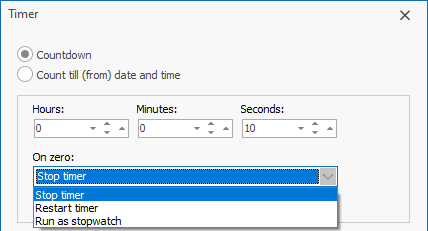
- Improved: The form for editing the timer has been changed.
- Improved: When the program starts, the main window remains hidden if it was hidden the last time the program was exited.
- Improved: The audio slider is hidden if the "Turn on the volume" setting is unchecked because the program changes the volume level for the system.
- Improved: The format of the overdue time label in the alert window has been changed.
- A new timer mode "OnZero: Run as stopwatch" has been added.
- Improved: Some interface languages have been corrected.
- Fixed: The program created an empty folder in C:\Users\
\AppData\Roaming - Some other bug fixes and improvements.
Tuesday, March 30, 2021
Free Countdown Timer 5.1 has been released
- Improved: Missed alerts are displayed in the reminder window.
- Now, when the "Show message" setting is turned off, the notification window does not disappear 30 seconds after it appears and the sound does not stop playing.
- Corrected the Greek interface language.
- Fixed: The online alarm website did not open correctly when using emoji.
Tuesday, March 23, 2021
Free Countdown Timer 5.0 has been released
- Improved: The design of the application has been updated. A new dark theme has been added. The application icons have been changed.
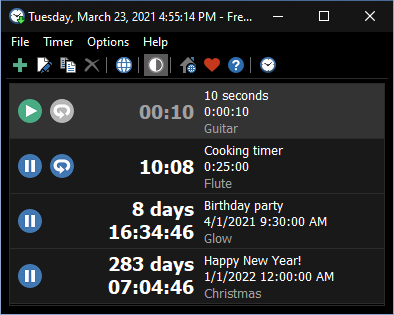
- New: The ability to pause the timer has been added.
- A new setting has been added to arrange the timer list by Time, Label, or Next alarm time.

- Improved: New font for numbers in floating windows is now used.
- Improved: When the timer is stopped, numbers in floating windows are displayed in muted gray.
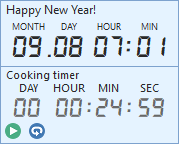
- New sounds have been added, some sounds have been renamed.
- New: Translations of the user interface into 5 languages: Hindi, Norwegian Bokmål, Persian, Kurdish and Estonian.
- New request and warning forms with the ability to cancel the reappearance of the form has been added.
- A new "Open Online Timer" button has been added.
- Improved: When editing a timer, you can set any values for minutes and seconds. They will automatically be converted to hours and minutes.
- Improved: When you add a new timer, the sound name and volume are set to the same as the last time you edited the sound settings.
- Improved: The countdown limit has been increased to 50 years, and the date limit has been removed.
- Improved: The notification message doesn't appear when the floating window is visible. The floating window starts flashing when the countdown expires.
- Improved: The OK/Close button in the reminders window is focused by default, but the reminders window itself does not become active when it appears to avoid accidentally closing it.
- Improved: If for some reason the sound could not play, the system beep starts playing.
- Improved: When the "Always on top" option is enabled, the caption of the main window is reduced and the program icon is removed from the taskbar.
- Improved: Translation of sounds into other languages has been added.
- Improved user interface translation in some languages (especially Asian languages).
- Improved: The work of the program on High DPI screens has been improved and fixed.
- Improved: An additional check has been added that prohibits the launch of multiple instances of the program.
- Improved: In Windows 7 and above, when playing the sound of the alert, all sounds are muted and music playback is paused, if the "Turn on the volume" option is checked.
- Changed: The sound of the metronome has been changed. You can change the sound of the metronome by changing the Metronome.wav file.
- Fixed: In Windows 10, the notification message disappeared after a few seconds and the music stopped.
- Fixed: When switching to winter time and moving the clock back one hour, alerts were triggered again.
- Fixed a bug with resetting the position of floating windows when working with multiple screens.
- Lots of other fixes and improvements.
Wednesday, December 16, 2015
Free Countdown Timer 4.0 has been released
- Free Countdown Timer now has full Unicode support.
- New command line parameter /ADDTIMER has been added. This parameter opens the new timer window.
- New: 6 alarm sounds have been added.
- New: Translations of the UI into Greek and Indonesian languages.
- Improved Windows 10 Compatibility.
- Improved: The reminder window shows the snooze time on the snooze button.

- Improved: The floating timer has a tooltip window that display the alarm time.
- Fixed: Sometimes the floating window displayed the incorrect amount of months and days.
- Fixed: Sometimes the alarm event did not bring the reminder window to the foreground in Windows 8 and above.
- Fixed: Now you can't close the floating clock using the Alt+F4 hotkey.
- Fixed: If you used the ampersand character (&) in the label for an alarm event, "_" was displayed instead of "&" when the reminder window popped up for that event.
- Fixed: If the user presses the Enter key with the cursor in the date-time field, any changes made in that field are not saved.
- Some other fixes and improvements.
Wednesday, February 26, 2014
Free Countdown Timer 3.1 has been released
- Improved DPI Scaling support.

- Improved volume control behavior.
- Fixed issue with failure message "Floating point division by zero".
Monday, October 28, 2013
Free Countdown Timer 3.0 has been released
Changes in version 3.0:
- New: The Full Screen button has been added for floating windows.
- New: "Play Sound Duration" option. You can define for how long to play the sound.
- New: The "Stay on Top" option has been added for the main window.
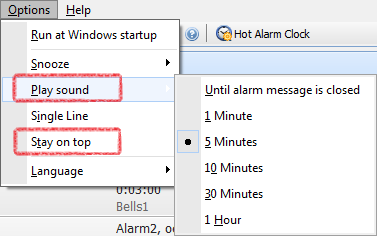
- New: "Cancel Snooze" command.

- New: Support for the flac audio files has been added. Support for the wav files has been improved.
- New sound SchoolBell.mp3 has been added.
- Fixed: Sometimes alarms not fires when the computer wakes up from a sleep mode.
- Fixed: Issue with sorting of timers.
- Fixed: When a timer reaches zero, the floating window starts flashing. It can't stop flashing when you set the "(None)" sound.
- Fixed: Alarm kept going off even when you hit Snooze and deleted the timer.
- Some other bug fixes and improvements.
Thursday, November 17, 2011
Free Countdown Timer 2.5 has been released
Changes in version 2.5:

- New: Ability to play a random song from a directory.
- New: Ability to execute a command or open URL instead of playing a song.
- New: Ability to play WAV and WMA files.
- New: A tooltip on the taskbar as an alarm notification.
- New: Added translations of the UI into Simplified Chinese, Romanian, Czech and Arabic languages.
- Improved: Whenever the system time changes, the program refreshes all countdown timers.
- Fixed: Issue with activating an already running program instance.
- Fixed: Issue with an incorrect time in the floating window.
- Fixed: Issue with playing sound.
- Fixed: Issue with daylight saving time.
- Fixed: Several floating windows begin to stick together and moving one distorts the positions of the others, even when not directly alongside them.
Monday, December 20, 2010
Free Countdown Timer 2.0
Free Countdown Timer software version 2.0 has been released!
It’s great to be able to fully concentrate on the task at hand while waiting for a future task to be ready for action. Free Countdown Timer can remind you about important events by playing your favorite music (you can set volume to a predefined level) and showing a notification message. Timers that you set will sound even if computer goes to sleep.

You can set the time in hours, minutes, seconds and an alarm will ring the counter reaches zero; or you can set date and time and an alarm will ring the counter reaches this time.
Free Countdown Timer supports unlimited number of timers so that you are not restricted to the number of alarms you can have.
Here are some events for countdown timer: New Year, Christmas, Halloween, Vacation, Birthday, Graduation, Wedding, Pregnancy, etc.
It’s great to be able to fully concentrate on the task at hand while waiting for a future task to be ready for action. Free Countdown Timer can remind you about important events by playing your favorite music (you can set volume to a predefined level) and showing a notification message. Timers that you set will sound even if computer goes to sleep.
You can set the time in hours, minutes, seconds and an alarm will ring the counter reaches zero; or you can set date and time and an alarm will ring the counter reaches this time.
Free Countdown Timer supports unlimited number of timers so that you are not restricted to the number of alarms you can have.
Subscribe to:
Posts (Atom)